Resources / Product Release Notes
Product Release Notes: QliqCHAT, Quincy, Visit Path
What shipped, release by release.
Current release: September 1, 2026 · QliqCHAT 3.3.606. Jump to a product below, or download any prior release from the archive.
Quincy 26.3.2.4 · September 11, 2026
Important notes
- ✓Refreshed sign-in pageThe sign-in page has been rebuilt on QliqSOFT's current branding, with updated typography, colors, and controls across the form and a new visual on the side panel. That panel can also carry announcement cards highlighting new features and resources, which rotate automatically, pause when hovered, and stay readable over a custom background image, video, or GIF. Sign-in itself is unchanged: the same fields, email and mobile options, and validation as before.
Video Visits / Quincy Chat
What's new
- ✓Transfer a conversation to another chat widgetConversations are no longer locked to the widget they started in. An agent can now hand an active conversation over to a different widget (for example, moving a patient from Intake to Home Care) and the receiving team picks it up with the full message history intact. The patient stays in the same conversation and doesn't have to start over or repeat themselves.
Chat Widgets
What's new
- ✓Off-hours auto-reply and quiet notifications for chat widgetsTwo new options in a chat widget's Out of Office settings cover what happens when patients message outside your posted hours. The first sends an automatic reply to patients who write into a conversation that's already open, separate from the message used for brand-new conversations, with its own translations and a suggested starting message that points patients to emergency care when needed. Replies are sent from the widget rather than an agent, appear in the transcript, and are limited to one per 15 minutes on SMS conversations to avoid a flood of texts. The second silences push and email notifications for messages that arrive outside business hours, then sends agents a single summary notification per widget when hours resume, skipped entirely if the messages were already read. Off-hours messages still appear as normal unread conversations, and both settings are per widget and off by default.
Care Campaigns
What's new
- ✓Webhooks for Automated CampaignsAutomated Campaigns can now report their progress to an external system in real time. Webhooks are configured per campaign, using the same connection settings as the Quincy API, including destination URL, credentials, retry attempts, monitoring email, and optional client certificates. Once enabled, the campaign reports when a run starts for a patient, what happened at each step of the sequence, what the patient replied, and how the run ended: completed, opted out, timed out, or stopped. Every event carries a run identifier and a position number so the receiving system can match events to the right patient and reconstruct the order they occurred in. Sample payloads are shown in the configuration screen so integrations can be built before the first live run.
Quincy 26.3.2.2 · September 4, 2026
Video Visits / Quincy Chat
What's new
- ✓Patients can @mention an agent they've already worked with.In a Quincy patient chat, patients can now type @ to bring up a list of the agents who have taken part in that conversation and direct a message to a specific person. The mentioned agent gets a notification that says they were mentioned and opens straight to the message in question, where they can take over the conversation and reply. The mention doesn't change who the conversation is assigned to. The current agent keeps ownership until someone explicitly takes over, and only agents who have actually sent a message in the thread can be mentioned, up to three per message. Admins can turn the feature off per chat widget with the Allow patients to mention agents setting, on by default.
Bug fixes
- ✓Patient attributes in chat widget and +Chat welcome messages.Welcome messages can now be personalized with patient information. In a chat widget's Customization settings and in the +Chat invitation screen, a patient attribute dropdown lets you insert fields such as first name into the welcome message, and the values are filled in when the conversation reaches the patient.
Chatbots
Bug fixes
- ✓Videos embedded in FAQs now play in chat bots.A video added to an FAQ now appears and plays correctly when the FAQ is shown in a chat bot, instead of displaying a "blocked" placeholder. Patients can watch embedded explainer videos directly in the conversation, and admins see the same in the bot preview.
Quincy Forms
Bug fixes
- ✓PDF form submissions open in a viewer instead of downloading.Clicking a PDF submission in the Form Submissions report now opens it in an in-app preview, so submissions can be reviewed without leaving the page. Downloading is still available as a separate action.
- ✓Consistent status wording on scored forms.The scored forms page now labels completed submissions "Submitted" rather than "Signed", matching the wording used elsewhere in Quincy Forms and the Submitted By and Submitted At columns alongside it.
QliqCHAT 3.3.606 · September 1, 2026
Desktop App
What's new
- ✓Walkie-Talkie mode - real-time voice messaging.Teams can now talk to each other almost like on a live radio. Turn on Walkie-Talkie mode on the device of your choice, then press and hold the new Talk button in any eligible conversation to record and send a voice message up to 30 seconds - slide up to lock hands-free recording, or slide away to cancel. Recipients with Walkie-Talkie mode on hear messages automatically: a short beep plays, then the voice message - even while working elsewhere in the app, and on mobile even when the app is in the background. An on-screen player shows who's talking, with pause, replay, and an instant hold-to-talk reply that routes back to the right conversation. Every message is also saved in the conversation as a distinct Walkie-Talkie bubble that can be replayed anytime, with "Played" receipts so senders know their message was heard. Only fresh Walkie-Talkie messages auto-play - older ones received while offline wait in chat history. Walkie-Talkie mode is active on one device per user at a time. Availability is controlled per organization.
Improvements
- ✓Admins can block conversation printing.Organizations that want tighter control over conversation content can now disable printing entirely. When an admin turns on the new Block Conversation Printing option in the admin dashboard's Security Settings → QliqCHAT App Settings, all print options are hidden throughout the app - including in conversations, message selection, conversation details, and attachment previews. When the setting is off, printing works as before.
- ✓Download button in file preview.Saving a shared file is now one click away: a dedicated Download button appears in the file preview toolbar for PDFs, images, videos, audio, and other file types, opening a Save As dialog pre-filled with the original filename and saving an exact copy of the file. Previously, saving was tucked away in the "..." menu and easy to miss; if a save fails, a clear error message now appears instead of nothing happening.
- ✓Consistent video sizes and lighter video sends.Videos attached to a conversation are now automatically optimized the same way as videos added through the Files page, so the same video shows the same size regardless of how it was added - and conversation videos send faster and use less bandwidth. The optimization applies whether the video is attached from a file picker, dragged and dropped, or pasted; photos, PDFs, and other file types are unaffected.
- ✓Create a Quick Todo from any message.Turn a received message into a personal to-do without retyping it. A new Create Todo action in Message Details opens the Quick Todo creation view with the message text pre-filled as the first checklist item - edit it, add more items, give the todo a name, and save. The todo is created for you, not the message sender, and appears alongside your other Quick Todos, with a "Todo created" confirmation shown. Available on messages containing text.
Bug fixes
- ✓Conversations containing undecryptable messages can now be printed.Printing a conversation now works even when it includes messages that couldn't be decrypted, so the rest of the conversation history can still be printed.
- ✓Microphone access alert on Mac.When microphone access is turned off for QliqCHAT on macOS, recording a voice message or creating a New Audio file now shows a Microphone Access Denied alert with an Open Settings button that takes you directly to the right settings page - instead of silently recording without sound.
- ✓All password requirements shown upfront when resetting a password.When creating a new password through the in-app Forgot Password flow, all of your organization's password requirements - such as minimum length, uppercase letters, numbers, and special characters - are now displayed before you type, instead of only the 8-character minimum appearing until a failed attempt revealed the rest.
- ✓Audio playback resumes after pause on Windows.Pausing an audio file in a conversation and pressing Play again now resumes from where you left off, instead of restarting from the beginning.
- ✓Drag and drop stays reliable.Dragging files into a conversation no longer randomly stops working mid-session. Previously, a single problematic drop could silently break drag and drop across the entire app until it was fully closed and reopened. Now every drop ends in a clear outcome - the file attaches or an error message appears - a failed drop never blocks the next one, and an error from one drop never resurfaces on a later successful one.
- ✓Upload to EMR options fully hidden when EMR integration is off.For organizations without EMR integration enabled, the Upload to EMR option is now hidden everywhere in the app - including the EMR folder on the Files page and the option in conversation details - so users are no longer presented with functionality that isn't available to them.
- ✓Seamless sign-in for accounts migrated to single sign-on.Users whose organization switched from password login to single sign-on can now sign in without the "Failed to process SSO response" error that previously blocked them entirely. After signing in with SSO, the app asks once for the previous QliqCHAT password to unlock messages from before the switch - this can be skipped and done later from Settings → Security → Unlock Previous Messages, or via the Reload button in an affected conversation. Once unlocked on one device, older messages open automatically on all of the user's other devices, and new messages are always readable regardless.
- ✓Screenshots can be pasted and dragged into conversations on Mac.Capturing a portion of the screen on macOS and attaching it to a message now works both ways: pasting from the clipboard attaches the screenshot as an image, and dragging the floating screenshot preview into a conversation attaches it without freezing the app. Dragging photos from the Photos app now works reliably too.
- ✓Dramatically reduced CPU usage on terminal servers.QliqCHAT no longer launches background helper processes every 30 seconds to collect diagnostic performance readings - a behavior that could double CPU utilization on terminal servers running many user sessions at once. The app now reads those values directly from Windows in a fraction of a millisecond, with no PowerShell or command-line processes created at all. On terminal servers, performance monitoring is now off by default, and a new setting (Settings → Support → Diagnostics → Performance monitoring) lets it be turned on or off instantly without a restart.
- ✓Reliable sign-in for SSO accounts.SSO users who had set a PIN could get stuck in a loop at sign-in: the PIN screen appeared, sign-in was rejected with a "password changed" message, the app repeatedly signed itself out, and the account could end up locked for 30 minutes. This no longer happens. Because a signed-out SSO session can only be restored through single sign-on, PIN and biometric unlock are no longer offered to SSO accounts - after inactivity or sign-out, the app returns to SSO sign-in, refreshing the session silently in the background without a trip to the identity provider whenever possible. Password-based accounts keep PIN and biometric unlock exactly as before.
Mobile App
What's new
- ✓Walkie-Talkie mode - real-time voice messaging.Teams can now talk to each other almost like on a live radio. Turn on Walkie-Talkie mode on the device of your choice, then press and hold the new Talk button in any eligible conversation to record and send a voice message up to 30 seconds - slide up to lock hands-free recording, or slide away to cancel. Recipients with Walkie-Talkie mode on hear messages automatically: a short beep plays, then the voice message - even while working elsewhere in the app, and on mobile even when the app is in the background. An on-screen player shows who's talking, with pause, replay, and an instant hold-to-talk reply that routes back to the right conversation. Every message is also saved in the conversation as a distinct Walkie-Talkie bubble that can be replayed anytime, with "Played" receipts so senders know their message was heard. Incoming Walkie-Talkie audio is politely suppressed during active voice and video calls, and only fresh messages auto-play - older ones received while offline wait in chat history. Walkie-Talkie mode is active on one device per user at a time and turns itself off after extended inactivity or sign-out. Availability is controlled per organization.
Improvements
- ✓Admins can block conversation printing.Organizations that want tighter control over conversation content can now disable printing entirely. When an admin turns on the new Block Conversation Printing option in the admin dashboard's Security Settings → QliqCHAT App Settings, all print options are hidden throughout the app - including in conversations, message selection, conversation details, and attachment previews. When the setting is off, printing works as before.
- ✓Consistent video sizes and lighter video sends.Videos attached to a conversation are now automatically optimized the same way as videos added through the Files page, so the same video shows the same size regardless of how it was added - and conversation videos send faster and use less bandwidth. The optimization applies whether the video is attached from a file picker, dragged and dropped, or pasted; photos, PDFs, and other file types are unaffected.
- ✓Create a Quick Todo from any message.Turn a received message into a personal to-do without retyping it. A new Create Todo action in Message Details opens the Quick Todo creation view with the message text pre-filled as the first checklist item - edit it, add more items, give the todo a name, and save. The todo is created for you, not the message sender, and appears alongside your other Quick Todos, with a "Todo created" confirmation shown. Available on messages containing text.
Bug fixes
- ✓Conversations containing undecryptable messages can now be printed.Printing a conversation now works even when it includes messages that couldn't be decrypted, so the rest of the conversation history can still be printed.
- ✓Persistent reminder when push notifications are disabled.If push notifications are turned off in device settings, the app now reminds you on each app launch - not just once - with options to go straight to settings, be reminded later, or silence the reminder. Silencing lasts as long as notifications stay off; the reminder appears at most once per session, so it won't interrupt you repeatedly.
- ✓Clear camera and microphone access prompts on Android.When camera or microphone access is turned off, opening the camera or starting a voice message now shows an Access Denied message with an Open Settings button and step-by-step guidance to the right permission - instead of freezing on a loading screen with no explanation.
- ✓All password requirements shown upfront when resetting a password.When creating a new password through the in-app Forgot Password flow, all of your organization's password requirements - such as minimum length, uppercase letters, numbers, and special characters - are now displayed before you type, instead of only the 8-character minimum appearing until a failed attempt revealed the rest.
- ✓Snap PDF respects camera permission on Android.When camera access is turned off for QliqCHAT in Android settings, Snap PDF no longer opens the camera anyway; it now shows a prompt directing you to Settings to enable access, consistent with the rest of the app.
- ✓Upload to EMR options fully hidden when EMR integration is off.For organizations without EMR integration enabled, the Upload to EMR option is now hidden everywhere in the app - including the EMR folder on the Files page and the option in conversation details - so users are no longer presented with functionality that isn't available to them.
- ✓Seamless sign-in for accounts migrated to single sign-on.Users whose organization switched from password login to single sign-on can now sign in without the "Failed to process SSO response" error that previously blocked them entirely. After signing in with SSO, the app asks once for the previous QliqCHAT password to unlock messages from before the switch - this can be skipped and done later from Settings → Security → Unlock Previous Messages, or via the Reload button in an affected conversation. Once unlocked on one device, older messages open automatically on all of the user's other devices, and new messages are always readable regardless.
- ✓Screenshot blocking applies reliably from the moment of sign-in.When an organization has Block Screenshots enabled, screenshots are now blocked as soon as a user signs in or opens the app - including when Block Access to Camera Roll is enabled at the same time. Previously, the screenshot restriction could fail to apply after a fresh app start, making it appear that the two security settings conflicted.
- ✓Face ID and PIN unlock appear reliably on every app open.Opening the app no longer occasionally skips the unlock screen and lands on the sign-in page instead. The PIN screen and automatic Face ID prompt now appear every time the app is opened, without needing to force-close and relaunch.
- ✓Reliable sign-in for SSO accounts.SSO users who had set a PIN could get stuck in a loop at sign-in: the PIN screen appeared, sign-in was rejected with a "password changed" message, the app repeatedly signed itself out, and the account could end up locked for 30 minutes. This no longer happens. Because a signed-out SSO session can only be restored through single sign-on, PIN and biometric unlock are no longer offered to SSO accounts - after inactivity or sign-out, the app returns to SSO sign-in, refreshing the session silently in the background without a trip to the identity provider whenever possible. Password-based accounts keep PIN and biometric unlock exactly as before.
Quincy 26.3.2 · August 31, 2026
Video Visits / Quincy Chat
Improvements
- ✓Quick Tasks is now Quincy Tasks.Quick Tasks has been renamed Quincy Tasks to better align with the Quincy product family. You'll see the new name throughout the platform, including navigation, settings, notifications, reports, and exports. Your existing tasks, templates, and workflows will continue to work as they do today.
- ✓Cleaner conversation view layout.The QuincyCHAT conversation view has been reorganized to make commonly used actions easier to find. Administrative tools remain in the header, while patient-facing actions such as starting a video call or screen sharing are now grouped in a dedicated menu. All existing functionality remains available; only the layout has changed.
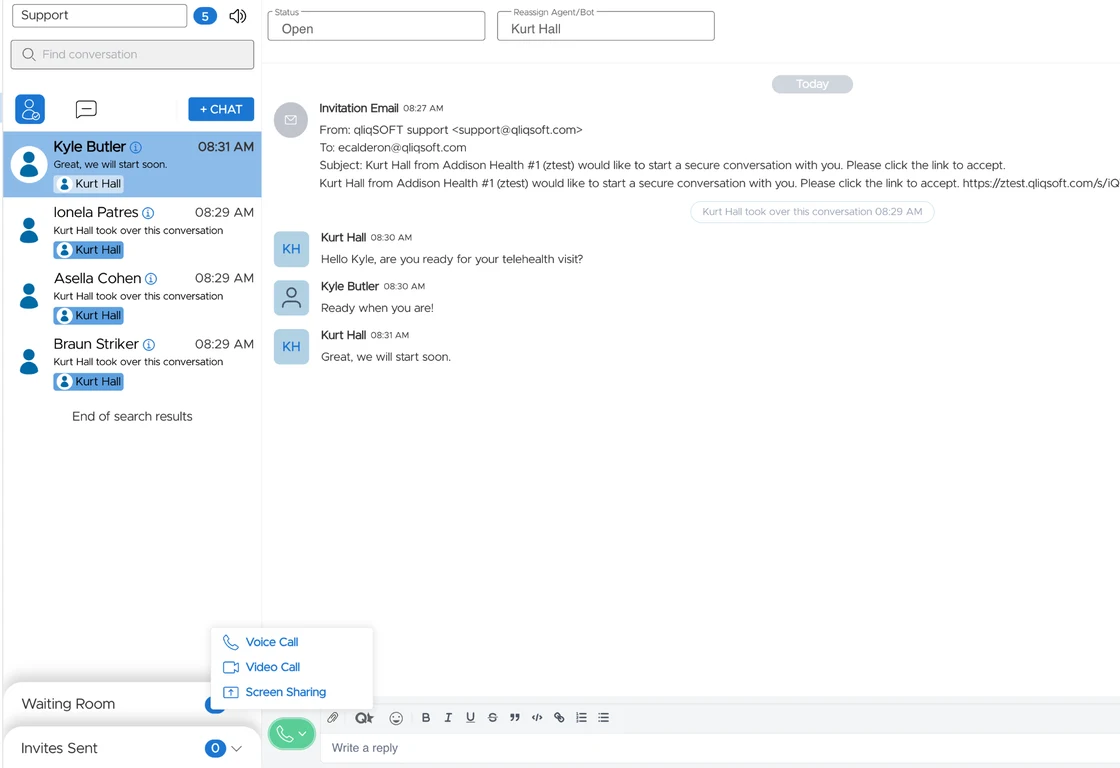
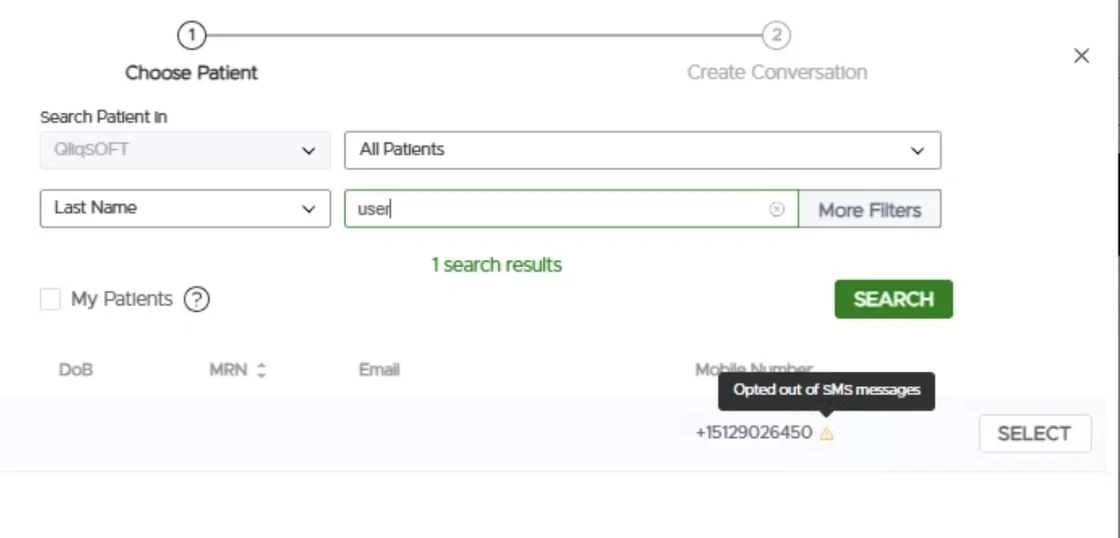
- ✓Patient opt-out status visible when sending a +Chat invitation.Agents can now see whether a patient has opted out of a communication channel directly from the +Chat invitation screen. This makes it easier to choose an appropriate communication method before sending an invitation.
- ✓Download or print completed Quincy Tasks and Quick Todos as PDF.Completed Quincy Tasks and Quick Todos can now be downloaded or printed as PDFs for documentation and record-keeping. PDFs include checklist details, completion status, timestamps, responses, and supported attachments.
- ✓Getting Started - interactive onboarding for QuincyCHAT agents.New agents now have access to an interactive, self-guided introduction to QuincyCHAT. The experience covers key features such as starting conversations, secure messaging, forms, eSign, bots, video visits, and productivity tools. Agents can complete the walkthrough at their own pace and return to it as needed.
- ✓Language selection messages now show the full language name.Translation system messages now display the full language name, such as “Ukrainian” or “English (US),” instead of language codes.
Bug fixes
- ✓Virtual backgrounds work again in video calls.Virtual backgrounds now apply correctly during QuincyCHAT video calls.
- ✓Patient search works with partial phone numbers.Patient searches in the +Chat workflow now support partial phone number searches, making it easier to find patients without entering their complete number.
Chat Widgets
What's new
- ✓Share one SMS number across multiple chat widgets.Organizations can now use the same SMS number across multiple chat widgets instead of purchasing and registering a separate number for each widget. Administrators can select an existing organization number when configuring a widget, and shared numbers are clearly identified.Replies sent to a shared number are routed to the sender's most recent conversation associated with that number. If no matching conversation is found, an automatic response can direct the sender to the secure chat experience. Shared number activity is also recorded in the audit log.
- ✓Branded bereavement ebook library with a book-style reader.Organizations subscribed to the Content Library can now create a branded version of the 20-book bereavement support library. Organizations can customize the books with their logo, organization name, website, support hours, and SMS contact information.The ebooks can be accessed through an enhanced reading experience with page-by-page navigation, chapter navigation, reading progress, adjustable font sizes, and light, dark, and sepia display options.
Improvements
- ✓Opt-in requests can now be delivered by phone call.Chat widget opt-in requests can now be sent by text message or delivered through an automated phone call. When delivered by phone, the configured opt-in message is read aloud in the patient's language, followed by simple instructions to press 1 to opt in or 2 to opt out.Opt-in status is shared across communication channels. A patient who opts out by phone will no longer receive messages, just as if they had replied STOP by SMS. A phone opt-in also allows SMS messages to be sent. If a patient does not respond, the existing widget settings for unanswered opt-in requests continue to apply.
Bug fixes
- ✓Copying a chat widget now carries over all configured text.When duplicating a chat widget, configured text such as welcome, away, and compliance messages, terms and conditions, help content, and SMS notification messages are now copied to the new widget. This makes it easier to create similar widgets without re-entering the same information.
Quincy eSign
What's new
- ✓Quick Sign is now Quincy eSign.Quick Sign has been renamed Quincy eSign to align with the Quincy product family. The new name appears throughout the platform, including navigation, page titles, settings, notifications, reports, and exports. Existing templates, documents, signatures, links, and workflows will continue to work as expected.
Improvements
- ✓Add a Purpose to Quincy eSign templates.Templates can now include a Purpose, which provides a short description of what the document is for. Purposes can be selected from a shared list or created when building a template or uploading a document. The Purpose can also be included in supported outgoing messages using a new placeholder, helping recipients understand why they are being asked to sign.
- ✓Copy and paste multiple fields at once.Template builders can now select multiple fields and checkboxes, copy them as a group, and paste them while maintaining the original layout. This makes it easier to create repeating sections and layouts.
- ✓Checkbox requirements are always visible when signing.Patients completing a Quincy eSign document can now see the selection requirements for checkbox groups throughout the signing experience, such as whether they can select only one option or whether all options are required.
- ✓Date-and-time field for Quincy eSign documents.Template builders can now add a field that captures both the date and exact time a document is signed or completed. The timestamp is displayed in the completed document and exported PDF using the group's configured time zone.
- ✓Alignment guides when resizing fields.Alignment guides now appear when resizing fields in the Quincy eSign editor, making it easier to size and align fields consistently.
Bug fixes
- ✓Improved keyboard navigation when signing.Pressing the Tab key while completing a Quincy eSign document now moves through fields in the correct visual order, making it easier to complete documents using the keyboard.
- ✓Signed field values now appear in the correct position in PDFs.Completed Quincy eSign PDFs now display signatures, dates, and other field values in their intended locations, including documents created from PDFs with rotated pages.
Quincy Forms
What's new
- ✓Quick Forms is now Quincy Forms.Quick Forms has been renamed Quincy Forms to align with the Quincy product family. The new name appears throughout the platform, including navigation, page titles, settings, notifications, reports, and exports. Existing forms, templates, submissions, links, and workflows will continue to work as expected.
- ✓Insurance card uploads can automatically populate form fields.Patients can now upload a photo of their insurance card and have available information automatically populate matching fields in the form. Supported information may include payer and plan details, member and group numbers, pharmacy information, copays, and contact numbers. Patients can review and edit any automatically populated information before submitting the form. Information that may require confirmation is highlighted, and manual corrections are preserved if the insurance card is uploaded again. If an image cannot be read, patients can continue completing the form manually. A ready-made Insurance Card subform is also available for organizations that want to quickly add this functionality to an existing form.
Improvements
- ✓Automatic deletion of older form submissions.Organizations can now configure automatic deletion of older form submissions based on their data-retention requirements. Administrators can choose how long submissions should be retained before they are permanently deleted. The feature is disabled by default and requires confirmation before being enabled. Activity related to retention settings and deletion runs is recorded in the Activity Log.
- ✓Scored forms can now be edited after submissions are received.Scored forms can now be updated even after submissions have been received. When changes are saved, a new version of the form is created. Previous submissions retain the scoring rules that were in place when they were completed, while new submissions use the updated configuration.
- ✓More compact Quincy Forms layout.Quincy Forms now use a more compact layout, making forms easier to review and reducing scrolling, especially on mobile devices and within embedded chat widgets.
- ✓See where a Quincy Form is being used.Administrators can now see where a form is being used before editing or removing it. A usage indicator shows when a form is referenced, with details about the bots and message sequences using the form.
Care Campaigns
Improvements
- ✓Preferred communication method for patient notifications.Organizations can now specify how each patient prefers to be contacted: Email, Mobile Number, or Both. Care Campaigns, One-Time Campaigns, and Automated Campaigns can use this preference when determining how notifications are delivered. In +Chat, the patient's preferred channel is automatically selected when starting a conversation, while staff can still change it when needed. The preference can also be managed through patient records, CSV imports, SFTP imports, and supported Quincy API workflows.
User Management
Improvements
- ✓Administrators can control the QliqCHAT Windows app update prompt.Organization administrators can now control whether Windows users are prompted to update the QliqCHAT desktop application directly from Security Settings → QliqCHAT App Settings.
Bug fixes
- ✓User removal is now available consistently for eligible users.Group administrators can now remove eligible users from their organization consistently, including duplicate accounts that previously could not be removed.
Reporting
Bug fixes
- ✓Date filters restored for Group and Broadcast message activity.The Group and Broadcast tabs of the Message Activity report now include the same date filtering available on the Individual tab, including quick-select time ranges, custom date ranges, and a Reset Filters option.
QliqCHAT 3.3.597 · July 14, 2026
Desktop app
What's new
- ✓QliqCHAT is now in the Microsoft Store.Windows users can download and install QliqCHAT directly from the Microsoft Store for a seamless installation experience.
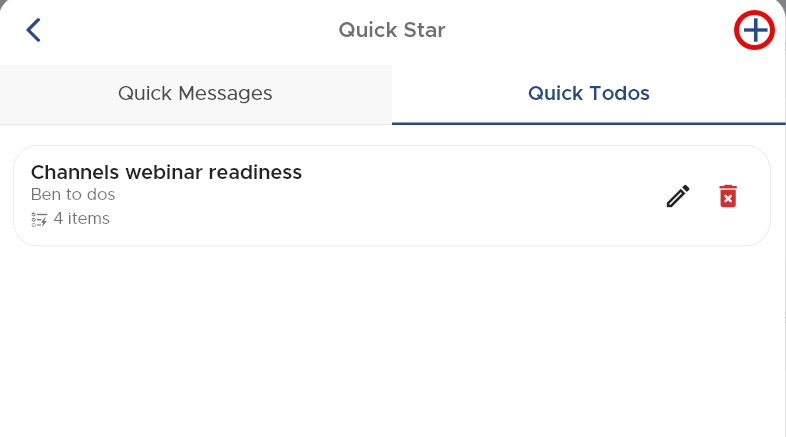
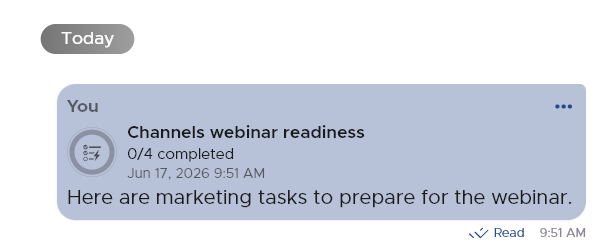
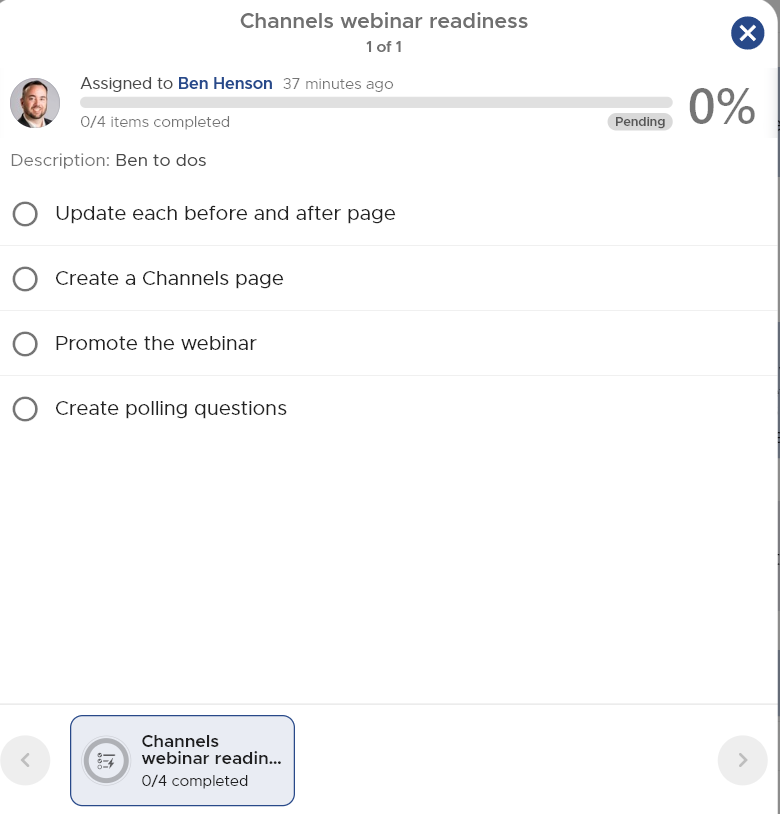
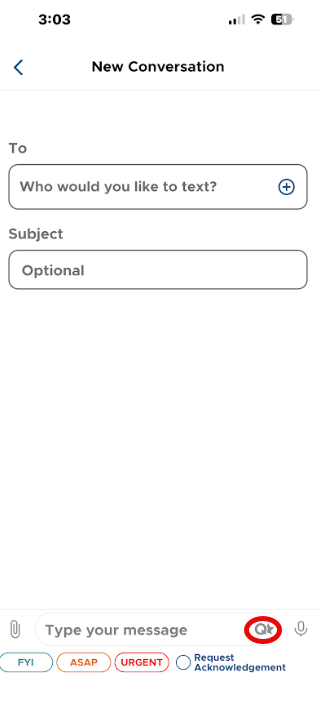
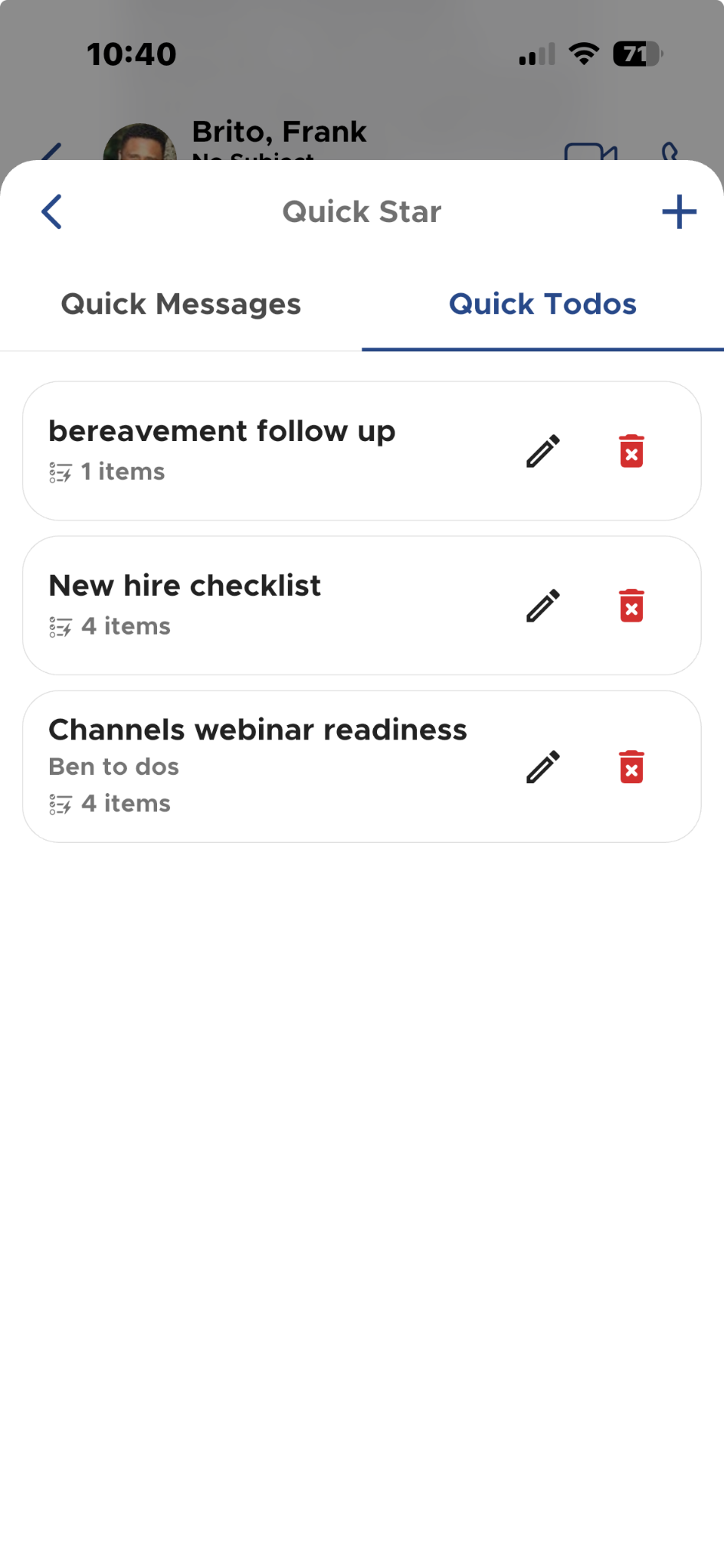
- ✓Quick Todos.Send simple checklists directly from chat using the new Quick Star (Q + star) composer menu, which replaces the old QM icon and groups Quick Messages and Quick Todos. Quick Todos work in both 1:1 and group conversations; in group chats, each participant gets their own checklist instance with per-person progress visible to all. QliqCHAT delivers in-app notifications when the app is open and push notifications when it runs in the background.

Improvements
- ✓The View More button on long messages is more visible in both light and dark schemes.
- ✓Scrolling a CSV preview with the mouse no longer changes the zoom level on desktop.
Bug fixes
- ✓PDFs can now be saved in QliqCHAT on Mac, and log download works on macOS (Settings, Support, Report Error).
- ✓The QliqCHAT icon initializes and displays correctly on first launch after a desktop update.
- ✓Replying to a text-message attachment with another attachment no longer errors.
- ✓Improved performance and cross-device syncing: messages send and sync promptly without reinstalls.
Mobile app
What's new
- ✓Quick Todos on mobile.The same checklist workflow arrives on iOS and Android, with per-person progress in group chats and notifications covering Todo assignment and completion.
Improvements and fixes
- ✓Pinch-to-zoom works on JPG attachment previews; the View More button is more visible.
- ✓Fixed infinite loading after app launch, attachment-reply errors, and cross-device sync delays; battery optimization status in Device Settings now reflects the Android system setting.
Visit Path
SOS: three-option escalation from the home screen
What's new
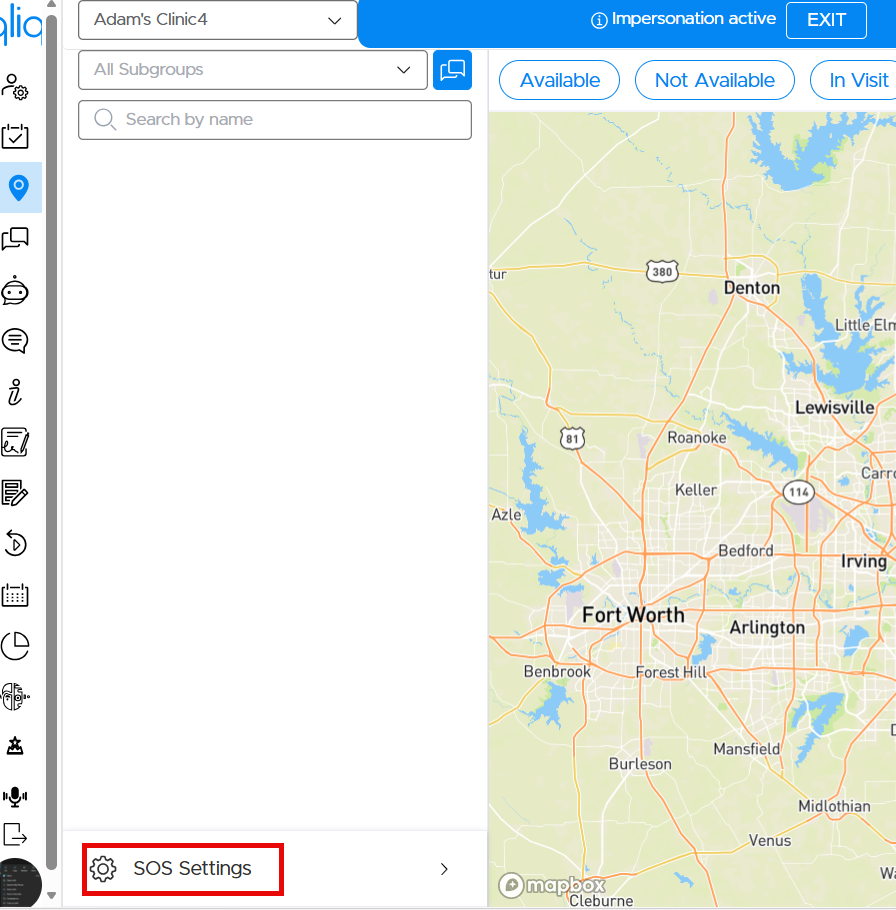
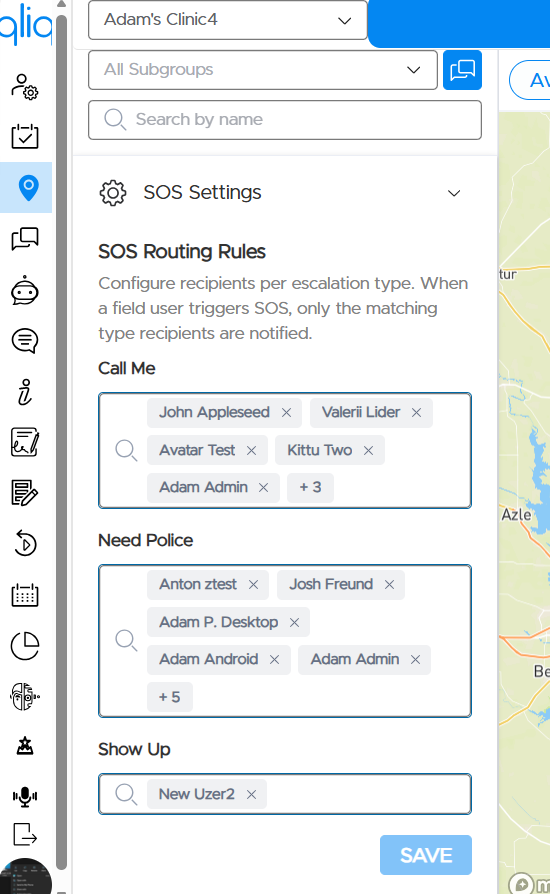
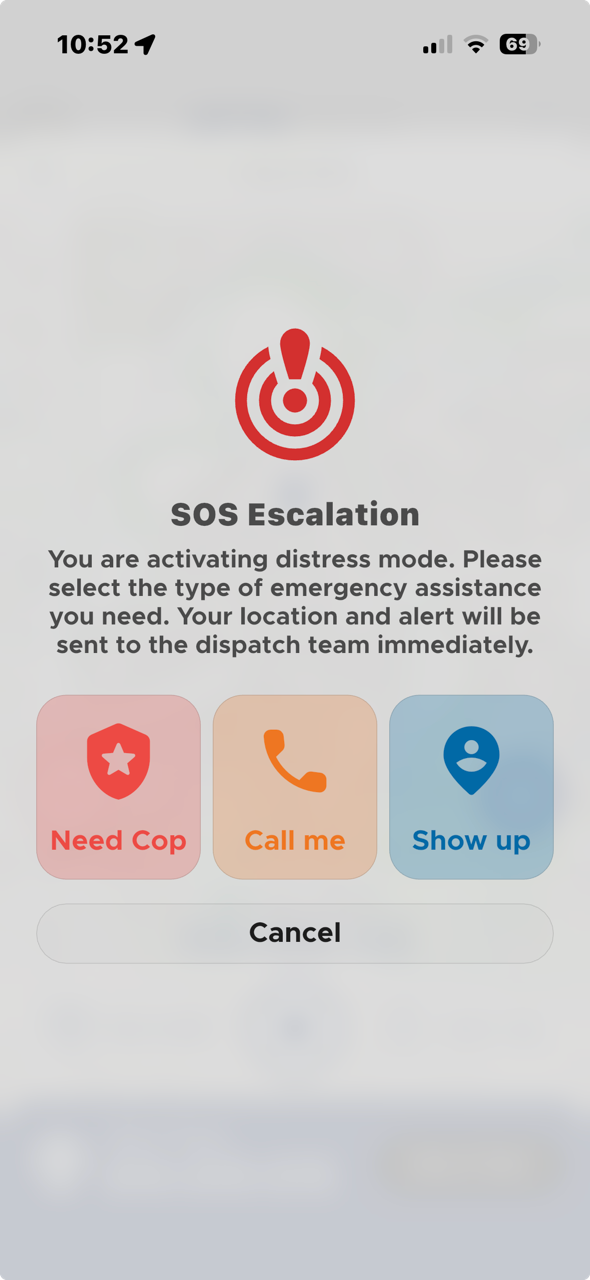
- ✓Three-option SOS escalation.Field workers can now escalate distress more precisely and faster. The in-app SOS prompt is replaced by a three-option modal (Need Cop, Call me, Show up), and group admins configure separate routing recipients per escalation type under Quincy, Visit Path, SOS Settings. A new home-screen widget and lock-screen surface (iOS 17+ Live Activity with Dynamic Island support; Android 8.0+ ongoing notification) puts the three SOS buttons on the device home and lock screens, so a field worker can trigger help without unlocking the phone or opening the app.
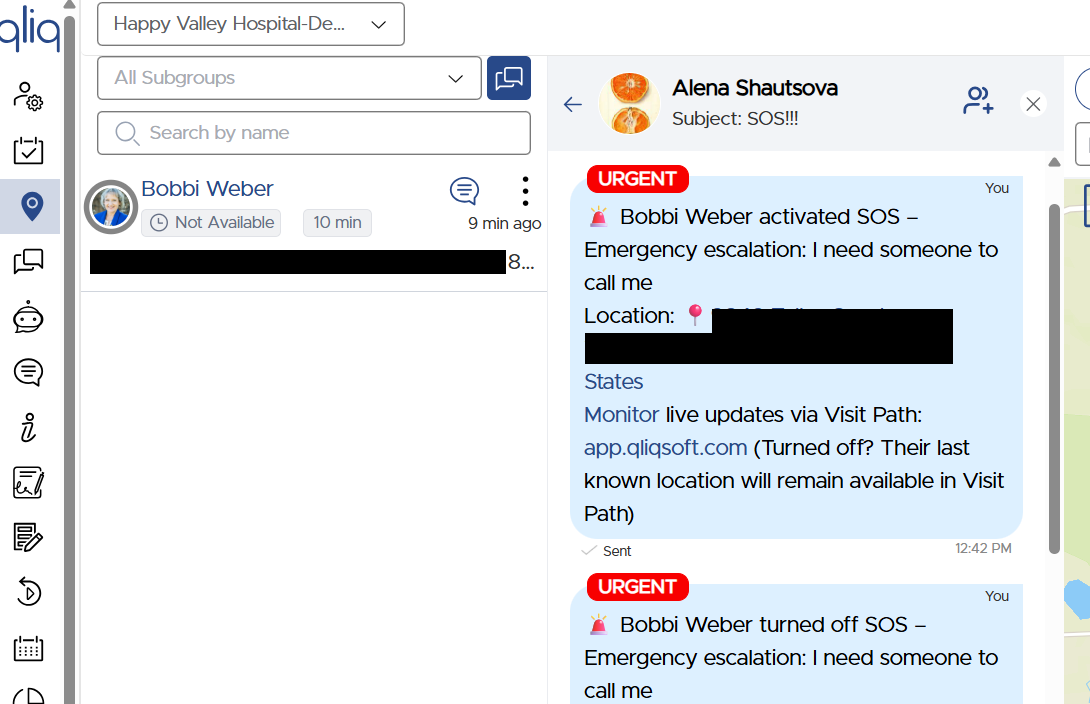
- ✓No visible distress indicator.Deliberately, no surface displays a persistent distress-active indicator: buttons return to their idle appearance after activation, and the active state is reflected only inside the app on the Visit Path screen. This is a security choice, so a person under observation does not signal at a glance that they have called for help.
Also in this release
Fill & Sign and Admin
- ✓Fill & Sign:the Upload to QliqSTOR toggle is now visible in the OFF state in dark mode on iOS.
- ✓Reporting:on the Secure Messaging Dashboard and Message Activity pages, the All time-range filter is replaced with a 6 Months filter to keep queries fast; other filters (24 hours, 7/30 days, 3 months, custom range) are unchanged.
Release archive
Previous releases (PDF)
June 22, 2026 →
March 26, 2026 →
February 11, 2026 →
January 2, 2026 →
December 24, 2025 →
November 12, 2025 →
October 30, 2025 →
September 17, 2025 →
July 22, 2025 →
June 30, 2025 →
May 29, 2025 →
April 17, 2025 →
Component archives
See the platform behind the releases
In a 30-minute demo mapped to your agency's workflows, intake, scheduling, between-visit monitoring, HHCAHPS readiness, we'll show you exactly where the numbers start to move.
Trusted by 1,000+ healthcare organizations since 2011